

Blog
How to Follow Up on Unsold HVAC and Plumbing Estimates (and Ask for the Review)
Casia, Rosada Automation14 min read
The best way to follow up on unsold estimates is a short, owned cadence: thank-you and options the day you leave, a real call within a day or two from the person who was in the home, one value touch around day 5 to 7, and a clear close-the-file ask by day 14. Stop the moment they reply, book, say no, or opt out. When the job is done, the same workflow sends a same-day Google review ask (no incentives), then one nudge a couple of days later if nothing posts. Automation runs the clock; your tech or advisor still owns the conversation.
Want to see where estimates stall in your shop first? Get the free workflow map. Free, no call.
Below: the schedule, the stop rules, the review ask, the messages, and how the workflow is built.
Why estimates go cold
Most unsold estimates aren't lost on the kitchen table.
They're lost in the gap between the estimate going out and the next intentional touch.
You already did the expensive work: answered the call, drove to the house, diagnosed the problem, built the options. Buying more leads while open estimates sit untouched just puts more opportunity into the same leaky system. Raise the Trades puts it plainly: an unsold estimate and a lost estimate aren't the same thing. "Awaiting response" with no recent contact is unresolved, not closed.
HVAC Growth Room's 2026 playbook lists the usual buckets: price surprise, another decision-maker, other quotes, no urgency, trust in the diagnosis, money or timing, and the simple one—nobody asked for the job or set a next step. Follow-up doesn't fix a bad presentation. It does handle the rest: find which bucket they're in, and help with that.
The Early Bird Assistants plumbing SOP makes the operating point: every open estimate needs one owner, one next action, and one stop condition. "Whenever someone remembers" is not a cadence.
What a good estimate follow-up looks like
Here's a practical starting schedule for residential HVAC and plumbing estimates. Adjust spacing to job size, season, and what the customer told you at the table.
| When | Channel | Purpose | Who |
|---|---|---|---|
| Day 0 (same day) | Email (+ text if consented) | Thank you, options/photos, one next step | Automated, advisor's name |
| Day 1–2 | Phone | Questions, real objection, other decision-maker | Person who was in the home |
| Day 5–7 | Call, then email if no answer | Value: financing, rebate, install slot—not "just checking" | Advisor or CSR |
| Day 14 | Text or email | Close-the-file: proceed / revise / later date / close | Automated |
| Day 30 / seasonal | Email or call (only if parked) | Nurture for "needs time" or seasonal deferral; else mark lost | CSR |
That's enough touches to get a disposition without crowding the inbox. Higher-ticket replacements may justify a longer nurture. A $300 repair doesn't. Two or three missed calls in a row is enough—then move to email.
Stop rules matter more than the schedule
A sequence without stop rules is how shops annoy good customers. Before every automated step, check:
- Did they reply? Pause everything and hand it to a person.
- Did they book / sell? Stop sales messages. Move them into the job lane, then the review ask when the work is done.
- Did they say no or opt out? Stop on every channel. Record the reason.
- Did they ask for a later date? Park the file until then. That's a reminder, not a lost lead.
- Was the estimate revised? Cancel messages that reference the old numbers or old scope.
No response is information. It isn't a disposition. Day 14 exists to get one.
After the job: ask for the review
This is the gap most estimate-follow-up guides leave out. The estimate sequence and the review ask belong in one workflow. When status flips to sold, sales messages stop. When status flips to job complete, the review lane starts.
| When | Channel | Purpose |
|---|---|---|
| Same day / within ~1 hour of job complete | Text (if consented) | Short thank-you + direct Google review link. Ask for an honest review. |
| Day 2–3 if no review | Text or email | One nudge. Then stop. |
A verbal ask on site is fine and often helps. The text is the system of record so it doesn't depend on who remembered.
Google Maps rules that matter here (this isn't legal advice; it's the short list from Google's Maps user-generated content policy):
- No incentives for reviews—no discounts, free goods, gift cards, or "leave a review for $10 off."
- Ask for honest reviews that reflect a real experience. Don't ask for five stars.
- Don't pressure people to leave a review while you're still on the premises, and don't ask them to include specific wording.
- Don't selectively solicit only customers you expect to be positive.
- You are allowed to solicit genuine reviews without incentives or attempts to influence the rating.
The rules that keep it clean
This isn't legal advice. Check the details with your own counsel. The short list:
- Get text consent before you text. A phone number on an estimate form isn't, by itself, permission to send automated texts. Use a clear checkbox, keep a record of who agreed and when, and identify your company in the first message. Twilio's messaging policy expects "Reply STOP to unsubscribe" (or equivalent) in the first message, and nothing more after an opt-out except one confirmation.
- Treat commercial follow-up email as CAN-SPAM. The FTC's compliance guide requires accurate From/subject info, your valid physical postal address, a clear way to opt out, and honoring opt-outs within 10 business days. An estimate follow-up pushing work the customer hasn't agreed to is safest treated as commercial, not transactional.
- Keep consent to the subject they agreed to. Consent to hear about this estimate isn't consent to a newsletter.
- Honor "stop calling" on a live call the same way you honor STOP on text. Your system needs a way to record that too.
Example workflow: how it's built

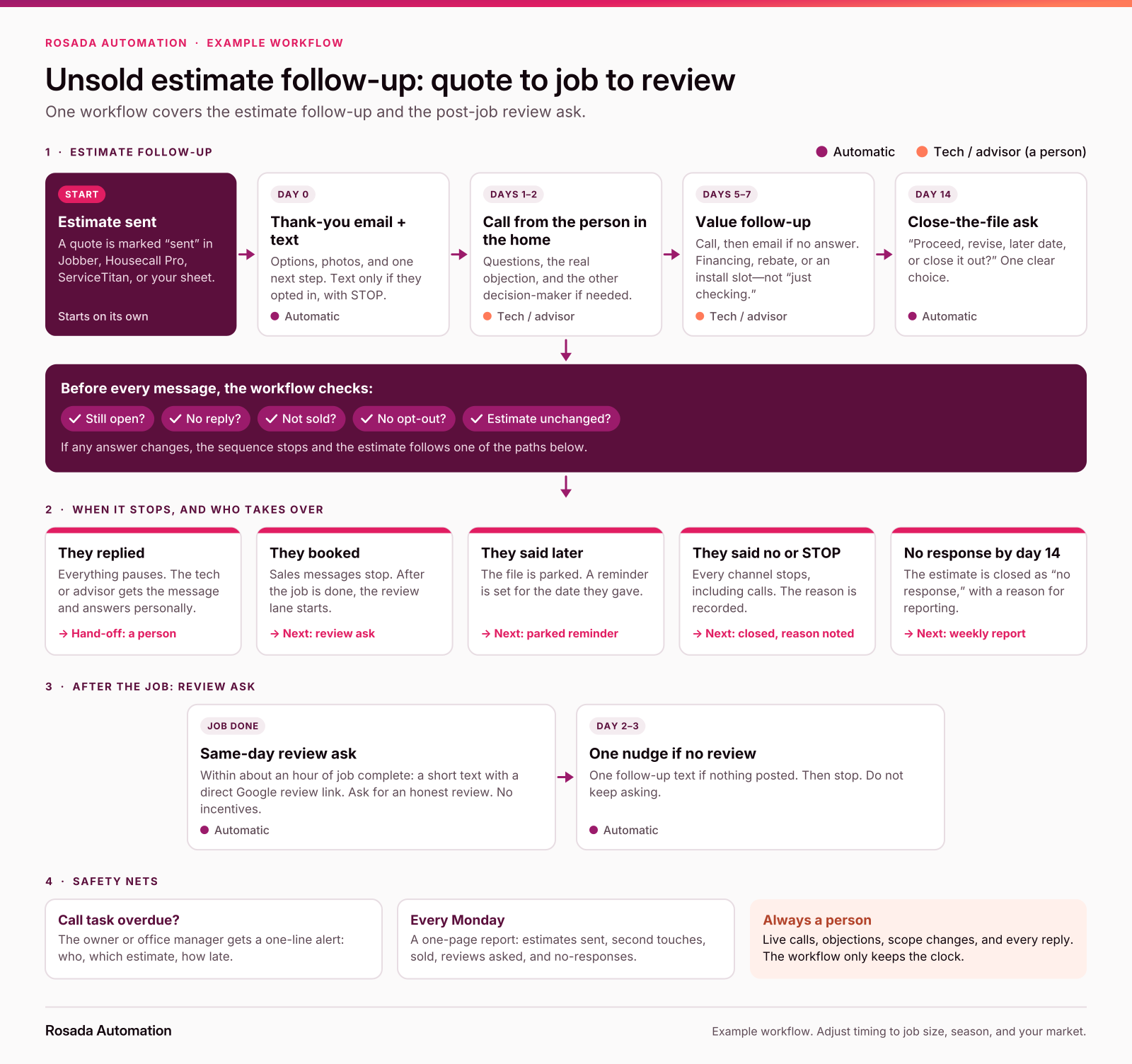
The example workflow at a glance: estimate follow-up, stop checks, dispositions, and the post-job review ask in one flow.
Want this mapped for your shop? The free workflow map shows how your estimates get followed up today and where they leak. Free. No email signup or call required.
Here's how an estimate-to-review workflow comes together in n8n for a small HVAC or plumbing shop. The tools are examples. The structure works with Jobber, Housecall Pro, ServiceTitan, a spreadsheet, or whatever you already use.
1. Trigger: an estimate is marked "sent." The workflow starts when estimate status changes in your field-service software, or when you mark it sent in a shared sheet. No one has to remember to start it.
2. Day 0 acknowledgment. An email goes out in the advisor's or tech's name with the options, photos, and one next step. If they checked the text box, a short text goes too, with your company name and STOP language.
3. Create the day 1–2 call task. The task lands with the person who was in the home: customer name, address, options presented, and the objection noted at the table if you captured one. If they're off, it queues for the next morning.
4. Wait, then check before each step. n8n's Wait node pauses the workflow for a set time, until a date, or until a webhook resumes it. Before every send, the workflow re-checks your system: still open, no reply, not sold, no opt-out, estimate unchanged. If any check fails, that branch stops.
5. Route replies to a person. Any reply—text or email—pauses the sequence and pings the owner with the message attached. Automation never answers scope, price, or technical questions.
6. Day 14 close-the-file. The last sales message asks a clear question: proceed, revise, later date, or close. "Later date" parks the file. Silence marks it "no response" with a reason code.
7. Sold → job complete → review lane. When the estimate sells, sales messages stop. When the job is marked complete, a same-day review ask goes out (text if consented) with a direct Google review link. If no review appears in two or three days, one nudge. Then stop. No incentives. No five-star requests.
8. Report weekly. A one-page summary lands in the owner's inbox every Monday: estimates sent, second touches, sold, reviews asked, reviews posted, and estimates closed with no response.
What stays human: the kitchen-table conversation, live calls, objections, scope changes, every reply, and the work itself. The workflow handles the clock and the reminders.
Message examples you can adapt
Short, specific, and from a person. Adapt the brackets.
Day 0 email subject: "Your options for [address]" "Hi Jordan, thanks for having us out today. Attached are the three options we went over, plus the photos from your system so you can share them with anyone else who's part of the decision. I'll call you on [day] to answer questions. Reply anytime. — Alex, [Company], [street address]"
Day 0 text (only with consent): "Hi Jordan, this is Alex at [Company]. Your estimate and photos are in your email. Any questions, just reply. Reply STOP to opt out."
Day 1–2 call opener: "Hi Jordan, this is Alex from [Company]. I was out at your place on [day] about the [system / water heater]. Any questions after you looked over the options?"
Day 5–7 voicemail / email: "Hi Jordan, Alex at [Company] about the options for your [system]. I've got an install opening on [date] if you'd like it, and I'm happy to walk through financing. Reach me at [number]."
Day 14 close-the-file: "Jordan, I don't want to keep emailing if the timing's off. Should we proceed, revise something, check back on a later date, or close this one out? One word is fine. — Alex"
Same-day review ask text (after job complete): "Hi Jordan, Alex at [Company]. Thanks for having us out today. If you're willing, an honest Google review helps neighbors find us: [direct review link]. Reply STOP to opt out."
Day 2–3 review nudge (only if no review): "Jordan, one last note from Alex at [Company]—if you have a minute for an honest Google review, here's the link again: [direct review link]. No worries if not. Reply STOP to opt out."
Note what's missing: "just checking in," fake "price expires Friday" urgency, incentives for reviews, and asking for five stars.
What to measure
Five numbers. Pull them weekly, not monthly.
- Estimates with a second touch. If this isn't near 100%, that's the first fix.
- $ in open estimates. Total of estimates still open. That's the pipeline follow-up is working.
- Follow-up close rate. Sold after the day they were given, divided by estimates not sold that day. Tells you whether follow-up is doing anything.
- Estimates closed with no response. Watch this shrink as day-14 dispositions improve.
- Reviews asked vs. reviews posted. After you add the review lane, track both. Asked without posted means the link, timing, or ask needs work.
Example math with made-up round numbers (not industry averages): say you give 40 replacement estimates a month and sell 14 on the spot or within the week. That leaves 26 open. If those average $11,000 each, that's about $286,000 sitting unresolved. Closing just 3 more of those 26 is 3 × $11,000 = $33,000 in extra monthly revenue on work you already priced. Plug your own numbers in. Yours will differ, maybe a lot.
Read these from your own book. Your market, ticket size, and lead sources will move them more than any published benchmark.
When you don't need this
If your shop sends a handful of estimates a week and one person sees every one, a shared list and a daily sort by next-follow-up date may be enough. Write the schedule down and use it.
The workflow earns its keep when estimates come from several techs or advisors, when people are in the field all day, when follow-up depends on whoever remembers, or when sold jobs never trigger a review ask.
Start with a map
Before you buy software or build anything, map where an estimate actually goes in your shop today. Who owns it after it leaves the house, how long until the first follow-up, and whether a completed job ever asks for a review.
FAQ
How many times should I follow up on an unsold estimate?
There isn't one magic number. A practical residential starting point is day 0, day 1–2, day 5–7, and a day-14 close-the-file ask—then stop or park. Higher-value or seasonal work may justify a later nurture. The goal is a clear disposition, not a fixed count of pokes.
How soon should I follow up after sending an HVAC or plumbing estimate?
Confirm delivery the same day, then make the first personal call within about one or two business days from the person who was in the home, unless the customer gave you a different timeline. Urgent repairs move faster. Planned replacements may move slower. Intentional beats "whenever we remember."
What should I say when following up on a job estimate?
Confirm they got it, ask one useful question, and offer a next step. Skip "just checking in." Later touches should add something—an answer, a financing note, an install slot—or ask for a disposition: proceed, revise, later date, or close.
Can I text customers about an estimate or ask for a Google review?
Only with the right consent for texts, and never with incentives for reviews. Identify your company, include STOP language, and honor opt-outs immediately. For Google reviews, ask for an honest review that reflects a real experience. No discounts for reviews, no five-star asks, no pressure on site, and no cherry-picking only happy customers.
Can I automate estimate follow-up without switching from Jobber / Housecall Pro / ServiceTitan?
Yes. Automate the clock: acknowledgments, call tasks, stop checks, the day-14 ask, and the post-job review texts. Keep people on live calls, objections, scope, and replies. The workflow structure is the same whether your source of truth is Jobber, Housecall Pro, ServiceTitan, or a well-kept sheet.
When should I stop following up—and when do I ask for the review?
Stop active sales follow-up when they book, decline, opt out, or you close the file after no response. If they need time, park it with a date. Ask for the review only after the job is complete: same day (or within about an hour), one nudge two to three days later if nothing posts, then stop.
Sources
- Elizabeth Northern, "Estimate Follow-Up for Contractors," Raise the Trades, updated September 2026: https://raisethetrades.com/estimate-follow-up-for-contractors
- HVAC Growth Room, "HVAC Unsold Estimates: A Follow-Up Playbook (2026)": https://hvacgrowthroom.com/guides/hvac-unsold-estimates-follow-up-2026
- Early Bird Assistants, "Plumbing Estimate Follow-Up SOP: A 7-Day Cadence," July 27, 2026: https://earlybirdassistants.com/blog/plumbing-estimate-follow-up-sop/
- FTC, "CAN-SPAM Act: A Compliance Guide for Business": https://www.ftc.gov/business-guidance/resources/can-spam-act-compliance-guide-business (accurate From/subject, physical postal address, opt-out honored within 10 business days)
- Google Maps User-Generated Content Policy, "Prohibited & restricted content" (Fake & Misleading Content & Reviews / Rating Manipulation): https://support.google.com/contributionpolicy/answer/7400114?hl=en (no incentives; no selective positive solicitation; genuine reviews without incentives are allowed)
- Twilio Messaging Policy: https://www.twilio.com/en-us/legal/messaging-policy
- n8n Docs, Wait node: https://docs.n8n.io/integrations/builtin/core-nodes/n8n-nodes-base.wait/
Casia