

Blog
How to Reduce Dental No-Shows: The Confirm, Flag, and Backfill Workflow
Casia, Rosada Automation10 min read
To reduce dental no-shows, don't stop at reminders. Send two short reminders with a one-tap way to confirm or reschedule. Flag anyone still unconfirmed the day before so a person calls them once. Keep a short-notice list so a cancelled slot gets offered to someone else right away. When a patient doesn't show, text the same day to rebook, and track no-shows so repeat patterns get a policy, not more texts.
Want to see where appointments slip in your office? Get your free workflow map. About 2 minutes. Free, no call.
The short version:
- Confirm: two reminders, each with "Reply C to confirm or R to reschedule."
- Flag: the day before, one call to anyone who hasn't confirmed.
- Backfill: text a short-notice list when someone cancels.
- After a no-show: a same-day text to rebook, then your policy for repeats.
Why don't reminders alone fix no-shows?
Reminders help. The research is clear on that. A 2016 BMJ Open systematic review found that electronic text notifications improve attendance and reduce no-shows across healthcare settings. Across its pooled studies, people who got notifications no-showed less often (15% vs 21%). It also found that multiple notifications worked better than a single one, and that voice reminders appeared more effective than texts. A Cochrane review found text reminders improved attendance compared with no reminders, with an effect similar to phone call reminders.
For dental offices specifically, the picture is mixed. A JADA study in a university pediatric dental clinic found voice messages beat text reminders. A study of a public dental outpatient clinic in Australia found its SMS reminders didn't reduce missed appointments.
So text reminders are your baseline, not your whole plan. The gains come from what happens to the people who don't confirm.
Step 1: How many reminders should you send, and what should they say?
A sensible starting point (not a rule): two reminders.
- Reminder 1: about two business days before.
- Reminder 2 (optional, for confirmed patients): the morning of, or the day before for early appointments.
Both include "Reply C to confirm or R to reschedule."
Stop rules:
- Once a patient confirms, they get no more reminders except the optional day-of message.
- An R goes to a booking link or a front-desk task. A person handles anything else they write.
- Never more than one message a day.
More isn't better. Past two, you're mostly training people to ignore you.
Copy-ready templates (minimum necessary: no procedure names, no clinical details, no balances; under 160 characters):
Reminder 1: [Practice]: Hi [First name], you're scheduled [Day] [Date] at [Time]. Reply C to confirm or R to reschedule. Reply STOP to opt out.
Day-of reminder: [Practice]: See you today at [Time], [First name]. Running late or can't make it? Reply here or call [number].
Confirmed reply: Thanks, you're confirmed for [Day] at [Time]. See you then.
Reschedule reply: No problem. Pick a new time here: [booking link], or reply with a day that works and we'll call you.
The ADA's own guidance on appointment confirmations says many practices confirm at least a day ahead, and suggests asking patients how they prefer to be reached.
Step 2: Who calls the patients who don't confirm?
At a set time the day before (say 2 pm), anyone who hasn't confirmed lands on a short list for the front desk. One call, one voicemail, done. Log the outcome: confirmed, rescheduled, or no answer.
Why a call? The BMJ Open review found voice reminders appeared more effective than text, and the JADA pediatric dental study found the same. The ADA's confirmations page notes that a friendly, familiar voice makes it more likely the patient keeps the appointment. Call only the few who didn't confirm.
Call script: "Hi [First name], it's [Name] at [Practice]. I'm calling to confirm your visit tomorrow at [Time]. Can you still make it? If not, I can find you a better time right now."
Voicemail: "Hi [First name], it's [Name] at [Practice] about your visit tomorrow at [Time]. Please call or text [number] to confirm. Thanks."
HHS says leaving appointment messages is fine, but keep the details limited: your name, number, and what's needed to confirm. The voicemail above does exactly that.
Step 3: How do you fill a cancelled slot fast?
Keep a short-notice list: patients who told you "I can come in early if something opens up." When a cancellation comes in, text the list. The first reply gets offered the slot, and a person confirms it on the schedule so two people never get the same chair.
Short-notice text: [Practice]: An opening came up [Day] at [Time]. Want it? Reply YES and we'll confirm. Reply STOP to opt out.
Check your practice-management software first. It may already have a waitlist or ASAP list. If you do hire someone to build the rest, here are questions to ask before you hire someone to build this.
What do you do after a no-show?
The same day: send a friendly "we missed you" text with a way to rebook. If there's no reply in two business days, a rebook task goes to the front desk.
Missed visit text: [Practice]: We missed you today, [First name]. Want to rebook? Reply here or pick a time: [booking link].
Repeat no-shows: flag them for your office's own policy. That might mean a confirmation call required before every visit, no prime-time slots, or a deposit. Those are your call. Check your state rules and your own patient policy first.
If the missed visit was treatment they'd already delayed, it goes back on your unscheduled treatment follow-up list. Hygiene recall is its own workflow, and I'll cover it in a separate post.
The workflow, start to finish
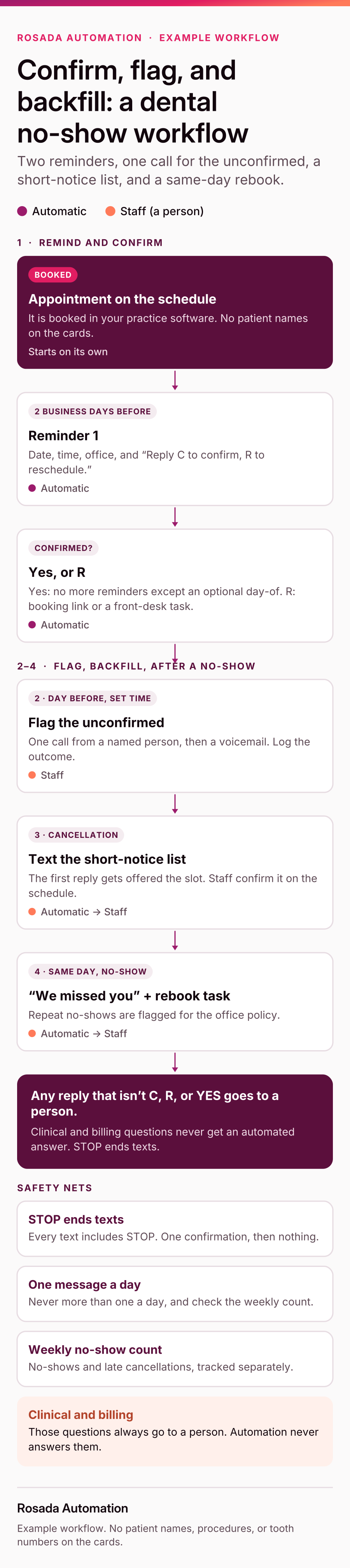
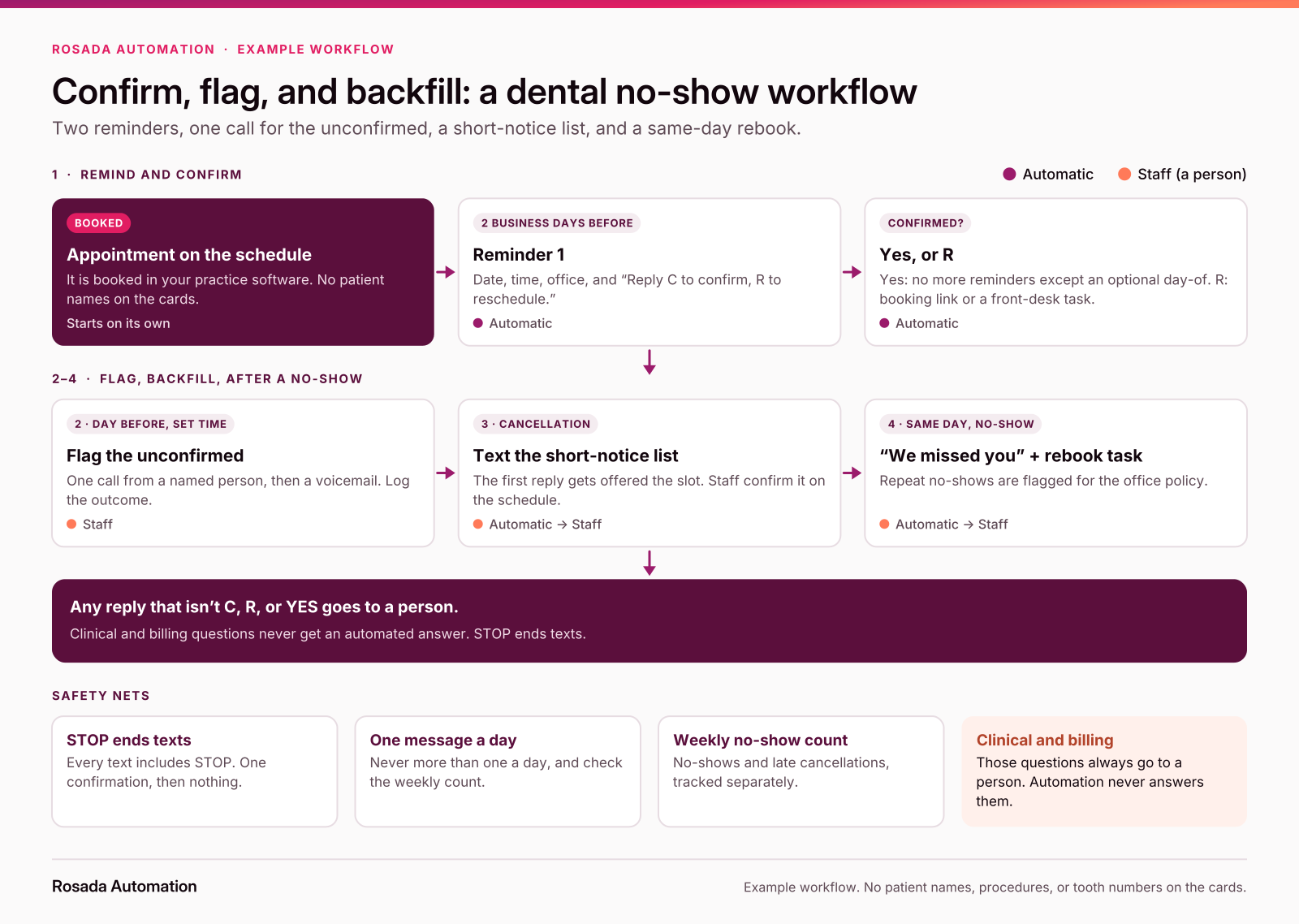
The example workflow at a glance: remind and confirm, flag the unconfirmed, backfill, and rebook.
Want this mapped for your office? The free workflow map shows how an appointment moves from booked to seated today, and where it slips. About 2 minutes. Free, no call.
How do you measure your no-show rate?
I'm not going to give you an "average dental no-show rate." Published numbers vary a lot by setting (public clinics, dental schools, private practices) and by how a no-show is counted.
Measure your own instead:
No-show rate = no-shows ÷ booked appointments, for the same period.
Track missed-without-notice separately from late cancellations, and split it by appointment type if you can. Compare yourself to last quarter, not to a number on a vendor's blog.
What are the privacy and texting rules?
This is general information, not clinical or legal advice. Check the details with your compliance advisor, texting vendor, and counsel.
- HIPAA: HHS says appointment reminders are part of treatment and can be sent without a patient authorization. HHS also says to limit what you disclose in messages and to honor reasonable requests for confidential communication (a different number, for example).
- Minimum necessary: the California Dental Association says standard SMS isn't inherently HIPAA-compliant without safeguards or consent, and that even on secure platforms you include only essential details, such as an appointment time and date. That's why the templates above leave out procedures.
- TCPA: the ADA's "Follow the rules when phoning patients" page lists conditions for exempt healthcare texts, including texts generally under 160 characters, no more than one message a day and three a week, and an easy opt-out in each. In a week with reminder 1, a day-of reminder, and a short-notice text, check the count.
- Opt-outs: the FCC's 2024 order says patients can revoke consent by any reasonable means, and that replies like "stop" count. Honor it within a reasonable time, no more than 10 business days. Send one confirmation, then nothing.
STOP confirmation: You're unsubscribed from [Practice] texts. Call [number] anytime.
When you don't need this
If no-shows are rare in your office and your front desk already calls every unconfirmed patient the day before, keep doing that. You already have the important part. Write down who makes the calls and when, so it keeps happening on busy days.
Start with a map
See an appointment reminders example run (sample data, not a dental client).
FAQ
How do I reduce no-shows at my dental practice?
Combine reminders with follow-through. Send two short reminders with a one-tap confirm, call anyone still unconfirmed the day before, offer cancelled slots to a short-notice list, and text no-shows the same day to rebook. Track repeat no-shows and handle them with an office policy.
How many reminders should a dental office send before an appointment?
Two is a sensible default: about two business days before, and the morning of or day before. Research suggests more than one reminder helps, but after two you're mostly adding noise. Stop reminding once a patient confirms, and never send more than one message a day.
What should a dental appointment confirmation text say?
The practice name, the day and time, and a simple way to confirm or reschedule, such as "Reply C to confirm or R to reschedule." Leave out procedure names and clinical details, keep it under 160 characters, and include a way to opt out.
Are phone calls better than text reminders for dental appointments?
For the patients who don't confirm, a call can help. Reviews of healthcare reminders found texts work similarly to calls overall, but some studies, including one in a pediatric dental clinic, found voice reminders more effective. Text everyone, then call the few who don't confirm.
Can we text appointment reminders and stay HIPAA compliant?
Generally yes, with care. Use a secure, practice-approved texting tool, include only what's needed (date, time, and practice name), follow each patient's communication preferences, and honor opt-outs. This is general information, not legal advice; confirm with your compliance advisor and texting vendor.
What's the average no-show rate for a dental office?
There isn't one reliable number. Published rates vary by type of practice and by how a no-show is counted. Measure your own: no-shows divided by booked appointments for the same period, tracked separately from late cancellations. Then compare against your own last quarter.
Sources
- BMJ Open, "Using digital notifications to improve attendance in clinic: systematic review and meta-analysis" (2016), PMC copy: https://pmc.ncbi.nlm.nih.gov/articles/PMC5093388/
- Cochrane, "Mobile phone messaging reminders for attendance at healthcare appointments": https://www.cochrane.org/evidence/CD007458_mobile-phone-messaging-reminders-attendance-healthcare-appointments
- Nelson et al., "Assessing the effectiveness of text messages as appointment reminders in a pediatric dental setting," JADA (2011): https://pubmed.ncbi.nlm.nih.gov/21454845/
- Australasian Journal of Information Systems, "The effectiveness of SMS reminders in a public dental outpatient clinic": https://doi.org/10.3127/ajis.v21i0.1405
- American Dental Association, "Appointment confirmations": https://www.ada.org/resources/practice/practice-management/appointment-confirmations
- American Dental Association, "Minimizing cancelled appointments": https://www.ada.org/resources/practice/practice-management/patients/minimizing-cancelled-appointments
- American Dental Association, "Follow the rules when phoning patients": https://www.ada.org/resources/practice/legal-and-regulatory/follow-the-rules-when-phoning-patients
- U.S. Department of Health and Human Services, FAQ: "Are appointment reminders allowed under the HIPAA Privacy Rule without authorizations?": https://www.hhs.gov/hipaa/for-professionals/faq/286/are-appointment-reminders-allowed-under-hipaa-without-authorization/index.html
- U.S. Department of Health and Human Services, FAQ: "May health care providers leave messages for patients?": https://www.hhs.gov/hipaa/for-professionals/faq/198/may-health-care-providers-leave-messages/index.html
- California Dental Association, "Using SMS, AI or new tech in your practice? Here's how to stay HIPAA-compliant": https://www.cda.org/newsroom/endorsed-services/using-sms-ai-or-new-tech-in-your-practice-heres-how-to-stay-hipaa-compliant/
- Federal Communications Commission, Report and Order FCC-24-24A1 (consent revocation): https://docs.fcc.gov/public/attachments/FCC-24-24A1.pdf
Casia