

Blog
Does Jobber or Housecall Pro Already Text Missed Calls and Follow Up on Quotes? What's Built In, and the Gaps
Casia, Rosada Automation11 min read
Both already do part of it. Housecall Pro has a Missed Call Automation that texts existing customers when you miss their call, and estimate follow-up automations that resend open estimates. Jobber can send up to two automatic quote follow-ups, and if you use its Receptionist, a setting called SMS send back texts callers who hang up. Turn those on first. The usual gaps are what happens next: new callers, replies that sit in an inbox, a call when the follow-ups run out, and stopping cleanly once the job is booked.
Not sure what your setup already covers? Get your free workflow map. About 2 minutes. Free, no call.
Vendor features below were checked against Jobber and Housecall Pro help docs on October 18, 2026. Plans and features change, so check your own account.
Short answer: should you turn on what you already pay for first?
Yes. If you're paying for Jobber or Housecall Pro, you already own some of the follow-up that other tools are pitching you. Turn it on, test it on your own phone, and then look at what's still falling through.
Most of what slips isn't the first text. It's the handoff after it: who sees the reply, who calls when nobody answers, and what makes the reminders stop.
What does Housecall Pro do out of the box?
Per Housecall Pro's help docs:
- Missed Call Automation. In Voice settings, you can turn on a text that goes to your existing customers when you miss their call. You pick when it runs: during business hours, outside business hours, or any time of day. You can edit the message, add your online booking link if you have Online Booking, and you must include your company name.
- Estimate follow-ups. Pipeline automations can resend an estimate and move it through First, Second, and Third Follow-Up. You set the timing and the message. The follow-up goes out the same way the estimate did, by text or email. After the third follow-up, the default rule declines the estimate.
- Rules only apply inside their timeframe. Housecall Pro's Pipeline FAQ explains that an older estimate outside the rule's window won't get the automation. You'd resend it by hand.
- Customer replies land in the Customers channel of your HCP Inbox. If the job is in progress, the assigned tech sees them in the app too. Texts aren't sent to landlines.
There's one more piece for new callers. Housecall Pro's CSR AI (its AI phone answering product) has a text follow-up feature that's currently in alpha. It texts new customers after a qualifying call that CSR AI handled, including calls that disconnect. Existing customers aren't included yet.
What does Jobber do out of the box?
Per Jobber's help docs:
- Quote follow-ups. On the Connect plan and up, Jobber can send up to two automatic follow-ups on quotes in "awaiting response" status. You choose how many days after the quote each one goes out, up to 90. They go out the same way the quote did and at the same time of day. The client has to have quote follow-ups turned on in their communication settings.
- Custom Automation Builder. On select plans, you can build your own rules from a trigger, conditions, and an action. The listed actions are notify the client, add a tag, or archive a quote.
- Receptionist SMS send back. If you use Jobber's Receptionist (its AI phone and text assistant), SMS send back texts callers who hang up before Receptionist can start a conversation. Per the docs, it goes to new callers and to existing clients, but not to anyone who got a text-back in the past 24 hours or anyone who replied STOP.
In the Jobber docs I read, the missed-call text lives inside Receptionist. Jobber's dedicated phone number is meant for texting. If someone calls it, the call forwards to the phone number in your company settings, if you've set one.
What gaps do both leave?
This is the part worth checking in your own account. I'm going off the docs, not every plan and setting, so treat each one as a question.
Gap 1: Are new callers covered?
A first-time caller is the lead you most want. Housecall Pro's Missed Call Automation targets existing customers. New callers get a text only if you use CSR AI with text follow-up turned on. In Jobber, SMS send back covers new callers, but only if you use Receptionist. If you use neither, a brand-new caller who hits voicemail may get nothing. If calls after hours are the bigger problem, here's how to handle after-hours calls.
Gap 2: Does a reply alert anyone?
A reply sitting in an inbox isn't a booked job. Both tools collect replies. The question is who gets pinged when one comes in, and how fast someone answers it.
Gap 3: Does a person call when the follow-ups run out?
In the docs I read, the automation actions in both tools send messages, change statuses, add tags, or archive. None of them assigns a call to a person. Housecall Pro's default declines the estimate after the third follow-up. One exception: Jobber's Receptionist creates a follow-up task when it takes a message.
Gap 4: Do the follow-ups stop when the job is booked?
Follow-ups key off the quote or estimate status. Housecall Pro's Pipeline FAQ says a follow-up call made through its Voice phone doesn't update the Pipeline status. You update it by hand or let the rules move it. So if a customer books by phone and nobody updates the estimate, they may still get a reminder.
After the job: is the review ask on?
Housecall Pro's Reviews app, when it's turned on, sends a review request once the job is marked finished. If your setup doesn't ask, here's a review requests example run (sample data).
| What to check | Housecall Pro (per docs, Oct 18, 2026) | Jobber (per docs, Oct 18, 2026) | The usual gap |
|---|---|---|---|
| Missed-call text | Missed Call Automation, existing customers. CSR AI text follow-up for new customers (alpha). | Receptionist SMS send back, new and existing callers. Check your plan. | New callers when you don't use the AI product |
| Quote or estimate follow-up | Pipeline: up to three resends, your timing | Up to two follow-ups, Connect plan and up | What happens after the last one |
| Where replies go | HCP Inbox, Customers channel | Check your message settings | Who gets alerted, and how fast |
| Call task after the last follow-up | Not in the actions I read | Not in the builder actions I read. Receptionist makes tasks when it takes a message. | A named person calls |
| Stop when booked | Status-based. Voice calls don't update Pipeline. | Status-based ("awaiting response") | Booked by phone, status not updated |
| Review ask | Reviews app, when the job is finished | Check your plan | Only if yours isn't on |
Your "check your account" list
- Is the missed-call text turned on, and does it reach new callers?
- Are quote or estimate follow-ups on, with timing you'd actually use?
- When a customer replies, who gets alerted?
- After the last follow-up, does anyone get a task to call?
- If a job is booked by phone, does someone update the status?
- Is the review request turned on?
How do you turn it on, then fill the gap?
Step one is free: turn on the built-in features. Step two is checking the four gaps above. Step three is filling only what's missing with a small connector that runs in your own accounts. That might mean a text for new callers, a reply alert to the owner, a call task after the last follow-up, or a booked status that stops everything.

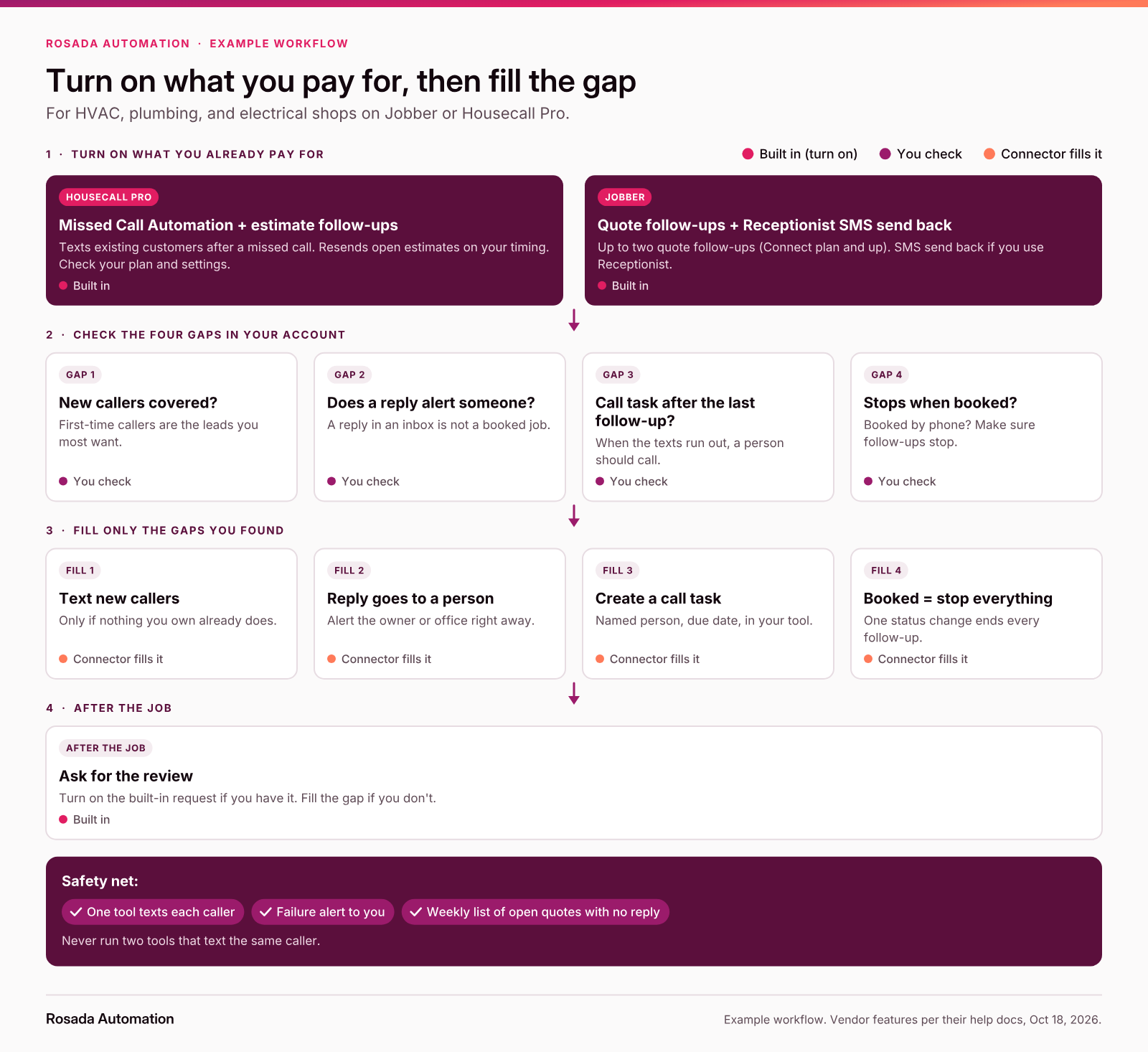
The example workflow at a glance: turn on, check, fill only the gap.
See the missed-call text back example run and the quote follow-up example run. Both use sample data, not a client.
Want to know which of these gaps you actually have? The free workflow map shows how a call or quote moves through your shop today, and where it stalls. About 2 minutes. Free, no call.
Do you need a separate text-back tool?
Often, no. If your software already texts missed callers, adding a second tool usually means the same caller gets two texts. Use what's built in, and add a connector only for the gaps you found. This is the kind of thing I build, in your accounts.
The rule I'd hold to: one tool texts each caller. If you do bring someone in, here are the questions to ask before you hire anyone.
Text message for missed calls from customers: where's the wording?
This post covers what's built in. For the words, see what to text when you miss a call. For timing and stop rules on quotes, see how to follow up on unsold estimates.
Start with a map
FAQ
Does Housecall Pro have missed-call text back?
Yes. Housecall Pro's Voice settings include a Missed Call Automation that texts existing customers after a missed call, during business hours, after hours, or any time. You can customize the message and add a booking link. For new callers, its CSR AI text follow-up is in alpha. Check your plan and settings.
Can Jobber automatically follow up on quotes?
Yes, on the Connect plan and up. Jobber can send up to two automatic follow-ups on quotes awaiting a response, up to 90 days after the quote, using the same channel the quote went out on. A Custom Automation Builder is available on select plans.
Do I need a separate missed-call text-back tool if my software already has one?
Usually not. Turn on what's built in first, then check the gaps: new callers, replies nobody sees, and what happens after the last follow-up. Add a small connector only for what's missing, and make sure only one tool texts each caller.
What should a text message for missed calls say?
Keep it short: your business name, that you missed their call, and one easy next step, like replying with what they need or booking a time. Our missed-call text guide at rosadaautomation.com/blog/what-to-text-when-you-miss-a-call has ready-to-use wording.
Why are customers still getting follow-ups after they booked?
Built-in follow-ups usually key off the quote or estimate status. If a job is booked by phone and the status isn't updated, the follow-up can still go out. Update the status, or connect booking so it stops follow-ups automatically.
What do Jobber and Housecall Pro follow-ups not cover?
In the docs we read, the main gaps are first-time callers when you don't use the AI phone product, alerting someone when a reply comes in, creating a call task after the last follow-up, and stopping everything once the job is booked.
Sources
- Housecall Pro Help Center, "Voice Settings Overview" (Missed Call Automation), updated July 22, 2026: https://help.housecallpro.com/en/articles/6750234-voice-settings-overview
- Housecall Pro Help Center, "Customer Notifications Overview" (Review Request, replies, landlines), updated January 21, 2026: https://help.housecallpro.com/en/articles/357613-customer-notifications-overview
- Housecall Pro Help Center, "Getting Started with Pipeline" (estimate follow-up automations, custom automations), updated August 6, 2026: https://help.housecallpro.com/en/articles/6185127-getting-started-with-pipeline
- Housecall Pro Help Center, "Pipeline FAQs" (timeframes, send channel, Voice and Pipeline status), updated July 15, 2026: https://help.housecallpro.com/en/articles/6185346-pipeline-faqs
- Housecall Pro Help Center, "CSR AI Text Answering (In Alpha)," updated August 27, 2026: https://help.housecallpro.com/en/articles/16673934-csr-ai-text-answering-in-alpha
- Jobber Help Center, "Automations" (quote follow-ups), updated August 6, 2026: https://help.getjobber.com/en/articles/automations/
- Jobber Help Center, "Custom Automation Builder," updated August 1, 2025: https://help.getjobber.com/en/articles/custom-automation-builder/
- Jobber Help Center, "Receptionist, powered by Jobber AI" (SMS send back, follow-up tasks), updated July 9, 2026: https://help.getjobber.com/en/articles/receptionistpowered-by-jobber-ai/
- Jobber Help Center, "Dedicated Phone Number," updated July 27, 2026: https://help.getjobber.com/en/articles/dedicated-phone-number/
- Rosada Automation, "Missed-call text back," "Quote follow-up," and "Review requests" (example runs with sample data): https://rosadaautomation.com/automations/missed-call-text-back, https://rosadaautomation.com/automations/quote-follow-up, https://rosadaautomation.com/automations/review-requests
Casia