

Blog
Dental Unscheduled Treatment Follow-Up: A Simple Workflow for Plans Patients Never Booked
Casia, Rosada Automation10 min read
To follow up on unscheduled dental treatment, pull the list of presented-but-unbooked plans every week, remove anyone who shouldn't be contacted yet (pending pre-authorization, watch-and-monitor teeth, already booked, do-not-contact), and give each remaining patient two or three friendly touches over about a month, ending in a clear outcome: booked, deferred to a date, declined, or closed. Keep the messages short, name the doctor, leave out diagnoses and balances, and have a person handle every reply.
Want to see where treatment plans stall in your office? Get your free workflow map. About 2 minutes. Free, no call.
Below: who to skip, a calm cadence, copy-ready scripts, what to automate, and the privacy basics.
Why treatment plans stall
Most unscheduled plans aren't a hard no. They're a missing next step.
Common reasons, without percentages:
- Cost or insurance still uncertain
- It doesn't hurt yet, so it doesn't feel urgent
- They want to talk to a spouse or decision-maker who wasn't in the room
- The visit ended without a next appointment
- Fear or anxiety
- Nobody on your team owned the callback
The American Dental Association's guidance on accepted treatment puts the timing plainly: ideally, patients who need more extensive treatment return within about a week to discuss options. If too much time goes by before reappointing, they're less likely to come back even when treatment is still needed. Prompt, respectful follow-up keeps that window open—not pressure.
Who to leave off the list first
Before anyone texts or calls, strip the list. A message about the wrong plan costs trust, and staff stop trusting the system.
Leave off, at minimum:
- Pre-authorization still pending — waiting on the carrier, not the patient
- Watch-and-monitor — observe, not schedule yet
- Already booked — related appointment on the calendar
- Do-not-contact — opted out, or the chart says leave them alone
- Sensitive diagnoses — text is the wrong channel, or the dentist will call personally
- Doctor-will-call — the dentist owns this one; don't automate around it
Exclusions first, then outreach. Write the suppression list down and apply it every week before the first send.
A follow-up rhythm that isn't pushy
Two or three touches over about a month is a reasonable default. Treat the dates as starting points, not rules.
| When | Channel | Purpose | Who |
|---|---|---|---|
| Day 2–4 after the visit | Text | Friendly check-in; name the doctor; no diagnosis | Automated (after staff OK) |
| Day 7–10 | Phone | Likely blocker: cost, insurance, timing | Named team member |
| Day ~30 | Text | Book, later month, or "not now" | Automated |
| After that | — | Record an end state | Staff |
End states: Booked · Deferred to a date (reminder set) · Declined (noted, no more messages) · Closed after no response.
"Still open for eight months" is not an end state. A clear outcome keeps the list honest.
No-show reminders and hygiene recall are different workflows. This post is only for treatment that was presented and never booked.
Copy-ready messages
Keep texts under about 160 characters where you can. Name the practice. Include STOP. Leave out diagnoses, tooth numbers, procedure names, and balances.
1. Text 1 (day 2–4)
Hi [First name], it's [Practice]. Dr. [Name] wanted to check in about the treatment you discussed. Want help finding a time? Reply here. Reply STOP to opt out.
2. Phone call opener (day 7–10)
"Hi [First name], this is [Name] from [Practice]. I'm calling about the treatment Dr. [Name] went over at your last visit. A lot of people have questions about timing or insurance after they leave. Is there anything I can answer?"
3. Voicemail (if no answer)
"Hi [First name], it's [Name] at [Practice]. Just checking in after your visit. Call or text us at [number] whenever it's convenient."
4. Text 2 (day ~30)
Hi [First name], [Practice] here. Still want to plan the treatment Dr. [Name] recommended? Reply BOOK, LATER, or NOT NOW. Reply STOP to opt out.
5. Saved replies (for staff)
- Cost/insurance: "Good question. I'll check your benefits and call you with what it looks like. Is today or tomorrow better?"
- LATER: "No problem. Which month works better? I'll check in then."
- NOT NOW: "Understood, thanks for letting us know. We'll note it, and you can call anytime."
6. Internal task note
Unscheduled tx follow-up · [Patient ID] · Presented [date] · Blocker noted: [cost / insurance / timing / unknown] · Outcome: [booked / deferred to (month) / declined / closed].
Example (fake patient, labeled as such): Jamie · Presented Oct 3 · Blocker: insurance · Outcome: deferred to January. No real chart data.
The workflow, start to finish
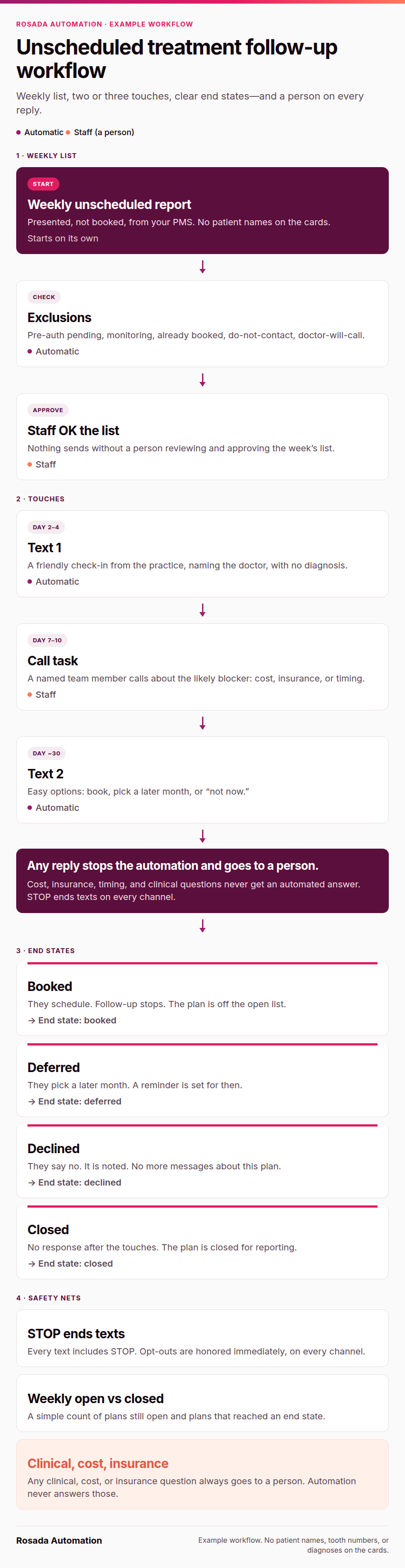
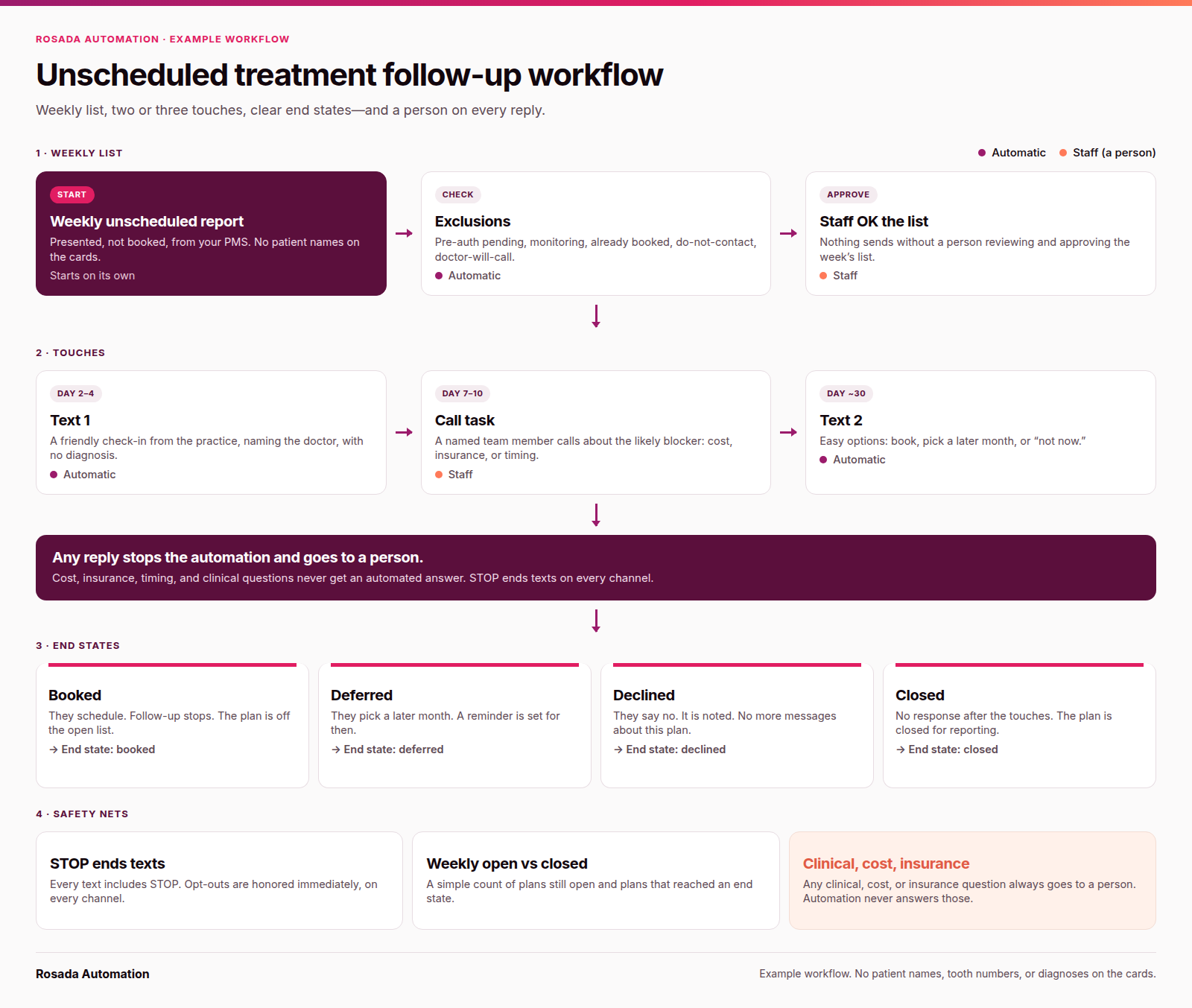
The example workflow at a glance: weekly list, exclusions, staff approval, two or three touches, and clear end states.
Want this mapped for your office? The free workflow map shows how a treatment plan moves from the chair to the schedule today and where it stalls. About 2 minutes. Free, no call.
Want to see what an automation like this looks like running? Here's a demo I built for a made-up HVAC shop (not a client): rosadaautomation.com.
In short: weekly report → exclusions → staff approve → text (day 2–4) → call task (day 7–10) → text (day ~30) → end state. Any reply stops the automation and goes to a person.
(Same idea as unsold estimate follow-up for home services: one owner, a short cadence, and a clear stop.)
What to automate and what stays with your team
Automate: the weekly list, exclusions, scheduled texts, call tasks, and outcome logging.
People: every reply, cost or insurance questions, clinical questions, and anything sensitive. Staff approve the list before the first send.
Build it on the tools you already have—check your PMS's unscheduled treatment report and keep your current texting setup. If you hire someone to build this, ask these questions before hiring an automation agency first.
Privacy and texting rules
This is general information, not clinical or legal advice. Check details with your compliance advisor, texting vendor, and counsel.
California Dental Association guidance on SMS and new tech: standard SMS isn't inherently HIPAA-compliant without protections and consent; use a practice-approved tool with a business associate agreement; and Minimum Necessary still applies on secure platforms—appointment date and time, not clinical history. Don't put PHI into public AI tools. HHS's Minimum Necessary Requirement says covered entities must take reasonable steps to limit protected health information to what's needed for the purpose; keep texts short on purpose even when you're writing to the patient.
HHS marketing guidance: a message about a patient's own treatment (for example, reminding them to schedule care you already recommended) is generally treated as a treatment communication, not marketing. Don't turn the follow-up into a promotion.
HHS also says providers may communicate electronically with patients about health issues when they apply reasonable safeguards—limit how much detail you send, follow the patient's contact preferences, and use a practice-approved channel. That FAQ is written about email; apply the same caution to text.
The ADA's "Follow the rules when phoning patients" page describes conditions many HIPAA-covered practices use for certain healthcare (not marketing) messages: texts generally under 160 characters; at most one message per day and three per week; easy opt-out (STOP); honor opt-outs immediately; patients can revoke consent by any reasonable means; the message states the practice name and contact; send only to a number the patient provided; no marketing or billing content in those exempt healthcare messages. Check with your counsel—this isn't a free pass.
FCC Report and Order 24-24: consumers may revoke consent by any reasonable means; STOP, quit, end, and similar reply words are per se reasonable; a one-time confirmation text is OK if it isn't marketing; honor revocation in a reasonable time not to exceed 10 business days (sooner is better).
Put STOP in every text. One confirmation after they opt out. Then nothing.
When you don't need this
If your unscheduled list is small and a treatment coordinator already works it weekly with a set script, you may already have what you need. A weekly worklist with scripts already works when someone owns it. Write the exclusions and end states down, and skip the build until the volume outgrows the person.
Start with a map
FAQ
How soon should we follow up after a patient doesn't schedule treatment?
A few business days after the visit is a good start, while the conversation is still fresh. Pick a fixed day and stick to it so follow-up happens every week, not just when the front desk has a slow morning.
How many times should we follow up on an unscheduled treatment plan?
Two or three touches over about a month is a reasonable default: a text, a call, and a final text. Then close the loop with a clear outcome. Endless reminders annoy patients and clutter the list.
What should an unscheduled treatment text say?
Keep it short: the practice name, the doctor's name, a friendly check-in, and an easy way to reply or book. Leave out diagnoses, procedure details, and balances. Include STOP language.
Should we text or call about unscheduled treatment?
Both. A text is easy to answer. A call is better for questions about cost, insurance, or timing. Many practices text first and call if there's no reply.
Is it HIPAA-compliant to text patients about treatment?
It can be, with care. HHS says providers may communicate electronically with patients about health issues when they apply reasonable safeguards, and the ADA covers TCPA conditions for certain healthcare texts. Use a secure, practice-approved texting tool, keep messages to the minimum necessary details, follow the patient's communication preferences, and honor opt-outs. This is general information, not legal advice; check with your compliance advisor and texting vendor.
Can we automate this without replacing our practice-management software?
Usually, yes. The weekly list, the exclusions, the scheduled texts, and the call tasks can run on the tools you already have. Replies and anything clinical or financial stay with your team.
Sources
- California Dental Association, "Using SMS, AI or new tech in your practice? Here's how to stay HIPAA-compliant": https://www.cda.org/newsroom/endorsed-services/using-sms-ai-or-new-tech-in-your-practice-heres-how-to-stay-hipaa-compliant/
- U.S. Department of Health and Human Services, "Minimum Necessary Requirement": https://www.hhs.gov/hipaa/for-professionals/privacy/guidance/minimum-necessary-requirement/index.html
- U.S. Department of Health and Human Services, "Marketing": https://www.hhs.gov/hipaa/for-professionals/privacy/guidance/marketing/index.html
- U.S. Department of Health and Human Services, FAQ: Does HIPAA permit health care providers to use email to discuss health issues with patients?: https://www.hhs.gov/hipaa/for-professionals/faq/570/does-hipaa-permit-health-care-providers-to-use-email-to-discuss-health-issues-with-patients/index.html
- American Dental Association, "Follow the rules when phoning patients": https://www.ada.org/resources/practice/legal-and-regulatory/follow-the-rules-when-phoning-patients
- American Dental Association, "Accepted treatment": https://www.ada.org/resources/practice/practice-management/accepted-treatment
- Federal Communications Commission, Report and Order FCC-24-24A1 (consent revocation): https://docs.fcc.gov/public/attachments/FCC-24-24A1.pdf
- Kline, "Dental Unscheduled Treatment Follow-Up Guide": https://www.getkline.com/dental-unscheduled-treatment/follow-up-guide (vendor guide; used for exclusions/suppression and end-state ideas; not for revenue claims)
- Kline, "Why patients don't schedule treatment": https://www.getkline.com/why-patients-dont-schedule-treatment (reasons list; paraphrased in our own words, no percentages)
Casia