

Blog
After-Hours Calls for Small HVAC and Plumbing Shops: Voicemail, Answering Service, Text-Back, or AI Receptionist?
Casia, Rosada Automation10 min read
For a small HVAC or plumbing shop, the right after-hours setup is the one that turns a call into either a booked time or a real callback, not just a message. Voicemail alone loses the caller who won't wait. A message-taking answering service still leaves you calling everyone back. Missed-call texts and AI receptionists can both capture details and book routine jobs. Real emergencies still need a person on call. Most small shops end up combining two of these.
Not sure what happens to your after-hours calls today? Get your free workflow map. About 2 minutes. Free, no call.
What actually happens to a call after 6 pm
A homeowner with no heat at 9 pm calls the first shop that comes up. It rings out. They get a greeting, maybe leave a message, maybe don't. Then they call the next shop on the list, because their problem didn't stop at 6.
The next morning you return the call. Sometimes you book it. Sometimes they say someone already came out. Either way, you only find out after the fact, and nothing in your phone tells you how often it goes the second way.
That's the real cost of a dead line after hours. It isn't the call you missed. It's that nobody wrote down what the caller needed, nobody told them when they'd hear back, and nobody owns the callback until you're back at the shop.
So the question isn't "should someone answer at night." It's what you want to be holding at 7:30 the next morning: a booked visit, a list of real callbacks, or a stack of voicemails from people who already hired someone else.
The four options, side by side
There are really five setups here, because answering services come in two kinds: ones that take messages and ones that can book. I'm leaving prices out on purpose. They vary a lot by provider and plan, so get quotes.
| Voicemail only | Answering service (takes messages) | Answering service (books) | Missed-call text-back | AI receptionist | |
|---|---|---|---|---|---|
| Who responds | Nobody, live | A person | A person | An automatic text | An AI voice |
| Can it book a time | No | No | Yes, with calendar access | Yes, if it's wired to your calendar | Yes, if it's wired to your calendar |
| How emergencies reach a person | Only if you check | If they're told to page you | If they're told to page you | An URGENT reply sets off an alert | If it's set to transfer or alert |
| What's left in the morning | Every call | Every callback | Exceptions only | People who didn't reply, and landlines | Exceptions, plus anything it got wrong |
| Watch out for | Callers who won't wait | Paying for messages you still have to return | Script and calendar upkeep | Landlines, people who won't text | Mistakes, callers who hang up on AI |
Voicemail only
It costs nothing and it's honest if you don't do after-hours work. It breaks when the caller has water on the floor and won't wait for your morning.
Answering service that takes messages
A real person answers, which callers like. But if all they do is write down a name and number, you still make every callback yourself. If that's all you get, you're paying for a message pad.
Answering service that books
This is the version worth paying for: a person who can put routine jobs on your calendar and page your on-call phone for emergencies. The catch is upkeep. Someone has to keep their script and your calendar current.
Missed-call text-back
The call rings out and a text goes out within a minute asking what's wrong, the address, and whether it's urgent. Wired to your calendar, a reply can book a time on its own. It doesn't reach landline callers or people who won't text. I wrote up the actual wording in what to text when you miss a call.
AI receptionist
It answers every call, can capture details, and can book routine jobs. Setups usually let you escalate certain words, like "emergency," to a person by text or transfer. Watch how it handles tricky calls, and whether your callers stay on the line with it. Test it on your real call types before you rely on it.
How to choose: four questions
- How many after-hours calls are real emergencies, and do you actually offer emergency service?
- Will your callers text? Or do a lot of them call from landlines or just want to talk to someone?
- Can the option book into your calendar, or does it only take messages?
- Who gets woken up, and for what?
Some plain rules from those answers:
- Mostly estimate requests and no emergency service? Text-back plus booking may be enough.
- Real emergency calls most weeks? You need a live path to a person, either a service that pages you or an AI that transfers. Add a text as the backstop.
- Lots of older or landline callers? Lean toward a voice that answers, human or AI.
- If an option can only take messages, plan on working a callback list every morning.
The setup most small shops land on
Most shops I'd build for end up with a hybrid. Something answers or texts right away. Every call captures the same five things. Urgent calls go to the on-call phone, routine calls get booked or go on the morning list, and the owner sees a summary of all of it.

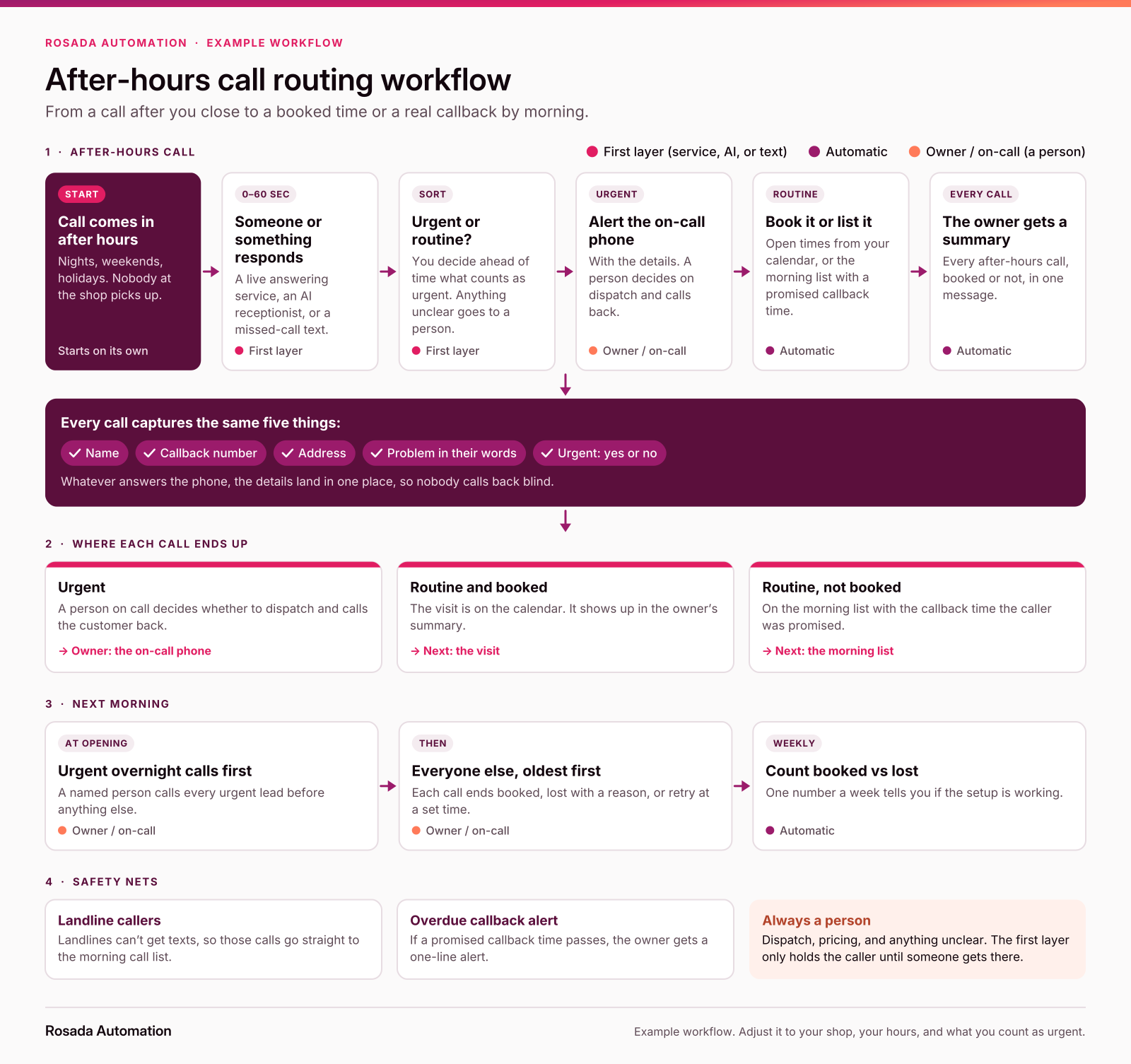
The text-back path here is the same one in the Northside Heating & Air demo on the home page (made-up shop, not a client).
The on-call alert can be this simple:
After-hours URGENT: [Name], [number], [address]. "[problem in their words]". Received [time]. Reply TAKEN when you call.
The morning list (where jobs are won or lost)
Whatever covers the night, someone has to work the list when you open. Give it to one named person and keep the order fixed:
At opening: 1) Call every urgent overnight lead first. 2) Then everyone else, oldest first. 3) Mark each one booked, lost (why), or retry at [time]. 4) Once a week, count booked vs lost.
Track it for a month before you change anything. After a month you'll know whether your night setup is booking work or just collecting messages.
A booked visit often turns into an estimate. From there it's a different job: following up on the estimate once it's sent.
Before you sign up for anything
Check what you already pay for. Jobber's AI Receptionist, for example, has separate business-hours and after-hours greetings, can escalate words like "emergency" to a team member, and creates follow-up tasks dated for the next day when a call comes in after hours. Housecall Pro's help center lists its automated texts, and a missed-call text isn't one of them, so ask your phone provider. If your software has something built in, the gap is usually what happens after it answers.
Two rules worth knowing. This is general information, not legal advice:
- Texts. Name the business, include STOP, honor opt-outs, and register your number for business texting (10DLC) through your provider. Details are in the missed-call text post.
- AI voices calling out. The FCC has confirmed that AI-generated voices count as "artificial or prerecorded voice" under the TCPA, so calls made with one generally need the person's prior express consent. That's about calls you make. An AI answering a call someone placed to you is a different situation, but check with your provider before you let it call anyone back.
When you don't need any of this
If you get very few calls after hours, skip it. Same if you have an on-call rotation that really answers live, or you don't take after-hours work and your greeting says so plainly:
You've reached [Company]. We're closed and don't run after-hours service. Leave your name, number, and address, or reply to our text, and we'll call you at [opening time].
Start with a map
Want to see one run? Watch the demo.
FAQ
Is an answering service worth it for a small HVAC or plumbing shop?
It can be, if it does more than take messages. If you still have to call everyone back in the morning, you're paying for a message pad. Ask whether it can book into your calendar and page your on-call person for emergencies.
Is an AI receptionist better than an answering service?
Not automatically. An AI receptionist answers every call and can capture details and book routine jobs. It can struggle with tricky calls, and some callers don't want to talk to AI. A good human service handles judgment calls better. Test either one on your real call types before committing.
Can missed-call texts replace an answering service?
For many small shops, partly. If most after-hours calls are routine and your callers text back, a fast text plus booking can cover a lot. It won't reach landline callers or people who won't text, and real emergencies still need a person.
What should happen to an emergency call after hours?
Capture the name, number, address, and problem, then alert whoever is on call right away. A person decides whether to dispatch. If you don't offer emergency service, say so clearly in the greeting and text so the caller isn't left waiting.
Is it legal to use an AI voice to call customers back?
Outbound calls that use an AI-generated voice are treated as artificial-voice calls under the TCPA, so they generally need the person's prior express consent. Answering an inbound call is a different situation. This is general information, not legal advice; check with your provider.
What's the cheapest way to stop losing after-hours calls?
Start with what you already have: check whether your phone system or field-service software can send a missed-call text, and set a morning routine to work every overnight call first. Then add booking or live coverage only where calls are still slipping through.
Sources
- FCC, Declaratory Ruling FCC 24-17 on AI-generated voices under the TCPA, released February 8, 2024 (paragraphs 2 and 5): https://docs.fcc.gov/public/attachments/FCC-24-17A1.pdf
- CTIA, "Messaging Principles and Best Practices," May 2023: https://api.ctia.org/wp-content/uploads/2023/05/230523-CTIA-Messaging-Principles-and-Best-Practices-FINAL.pdf
- Twilio Docs, "Programmable Messaging and A2P 10DLC": https://www.twilio.com/docs/messaging/compliance/a2p-10dlc
- Jobber Help Center, "Receptionist, powered by Jobber AI" (after-hours greeting, escalation policy, follow-up tasks), updated July 9, 2026: https://help.getjobber.com/hc/en-us/articles/25315927533847-Receptionist-powered-by-Jobber-AI
- Housecall Pro Help Center, "Email & SMS Communications," January 20, 2026: https://help.housecallpro.com/en/articles/12167734-email-sms-communications
Casia