

Blog
What to Text When You Miss a Call (HVAC and Plumbing, On a Job vs After Hours)
Casia, Rosada AutomationUpdated 11 min read
When you miss a call, text back within a minute from your business number. Say who you are, say you're on a job or closed, and ask for three things: what's wrong, the address, and whether it's urgent. Then make sure a reply turns into a booked time or a callback from a named person, because the text only holds the customer for a little while. Nothing is booked until someone answers it.
Want to see where calls slip through in your shop? Get your free workflow map. About 2 minutes. Free, no call.
The text is the easy part. The part most shops skip is what happens after the customer writes back.
Why the text matters more than the voicemail
A homeowner with no cooling or water on the floor isn't going to sit by the phone for you. They'll call the next shop on the list. A voicemail asks them to wait. A text gives them something to do right now: tell you what's wrong and where they are.
But the text only buys you a few minutes. A booked time or a real callback is what keeps the job.
The two texts you need: on a job vs after hours
Most shops send one generic message no matter when the call came in. You need two, because you're making two different promises.
When you're on a job (business hours)
The customer called during the day and you couldn't pick up. Tell them you're on a job, ask the three questions, and give them a callback window you can actually keep. "By 2:30" is better than "shortly," but only if you'll really be out from under the sink by 2:30.
When you're closed (after hours and weekends)
Say when you open. If you really run on-call emergency service, tell them how to reach it. If you don't, don't hint that you do. A promise nobody can meet at 11 pm is worse than an honest "we'll call you first thing."
What to leave out
No service list. No pricing. No more than one link. And no "your call is important to us." The customer knows it isn't, because nobody answered. Keep it short, sound like a person, and ask for what you need to help them.
Copy-ready missed-call texts
Swap in your details. Every first text names the business and includes STOP language.
1. On the job (business hours)
Hi, this is [Name] at [Company]. Sorry I missed you. I'm on a job right now. What do you need help with, what's the address, and is it urgent? I'll call you back by [time window]. Reply STOP to opt out.
2. After hours (no emergency service)
Thanks for calling [Company]. We're closed right now and open at [time] [day]. Reply with what's going on and your address, and we'll call you first thing. Reply STOP to opt out.
3. After hours (only if someone is really on call)
Thanks for calling [Company]. We're closed, but we have someone on call. If it's an emergency, reply URGENT with your address and we'll call you back. Otherwise reply with what you need and we'll call when we open at [time]. Reply STOP to opt out.
Optional, if you approve it for your shop: "If you smell gas, leave the house and call 911 or your gas company."
4. Three saved replies
- Urgent: "Got it. I'm flagging this as urgent now and [Name] will call you shortly." (Name a time only if you can keep it.)
- Estimate: "Thanks. I can get someone out to look at it. Here are the next open times: [time 1], [time 2]. Which works?"
- Send photos: "Thanks. Can you text a photo or two of [the unit / the leak / the panel]? It helps us bring the right parts."
5. Booking confirmation
You're booked for [day] at [time] at [address]. [Tech name] from [Company] will text when they're on the way. Need to change it? Just reply here.
6. No reply: one follow-up, then stop
Hi, it's [Company] following up on your call. Still need help with [issue, if known]? Reply here and we'll get you a time.
7. Owner or on-call notification (internal, not to the customer)
New missed-call lead: [Name], [number]. Need: "[their words]". Address: [address]. Urgent: [yes/no]. Booked: [time or "not yet"].
8. Voicemail greeting that matches the texts
You've reached [Company]. We're on a job or closed right now. We'll text you in a minute. Reply with what you need and your address, and we'll get back to you.
9. STOP confirmation (one message, then nothing)
You're unsubscribed from [Company] texts. You won't get more messages. Call [number] anytime.
What happens after they reply
This is where most missed-call setups quietly fall apart. The text goes out, the customer answers, and the answer sits in somebody's phone until the end of the day.
Sort the reply: urgent, estimate, or "send photos"
Keep three saved replies and use whichever fits. Urgent means a person calls now. Estimate means they get open times. Not sure yet means you ask for photos. A workflow can do the first sort, and anything it can't read goes to a person.
Get it booked or get it to a person
Estimate requests get real open times from your calendar, and picking one books it. Urgent replies alert whoever is on call with the name, number, address, and the problem in their own words. Photos get saved to the customer record so the tech sees them before the visit.
Who owns the callback
One named person, with fixed callback windows: back in the van, lunch, end of the job. If nobody owns it, it waits three hours.
The workflow, start to finish
Here's the whole thing on one page. It's the same flow as the demo on the home page, which runs on a made-up HVAC shop, not a client.

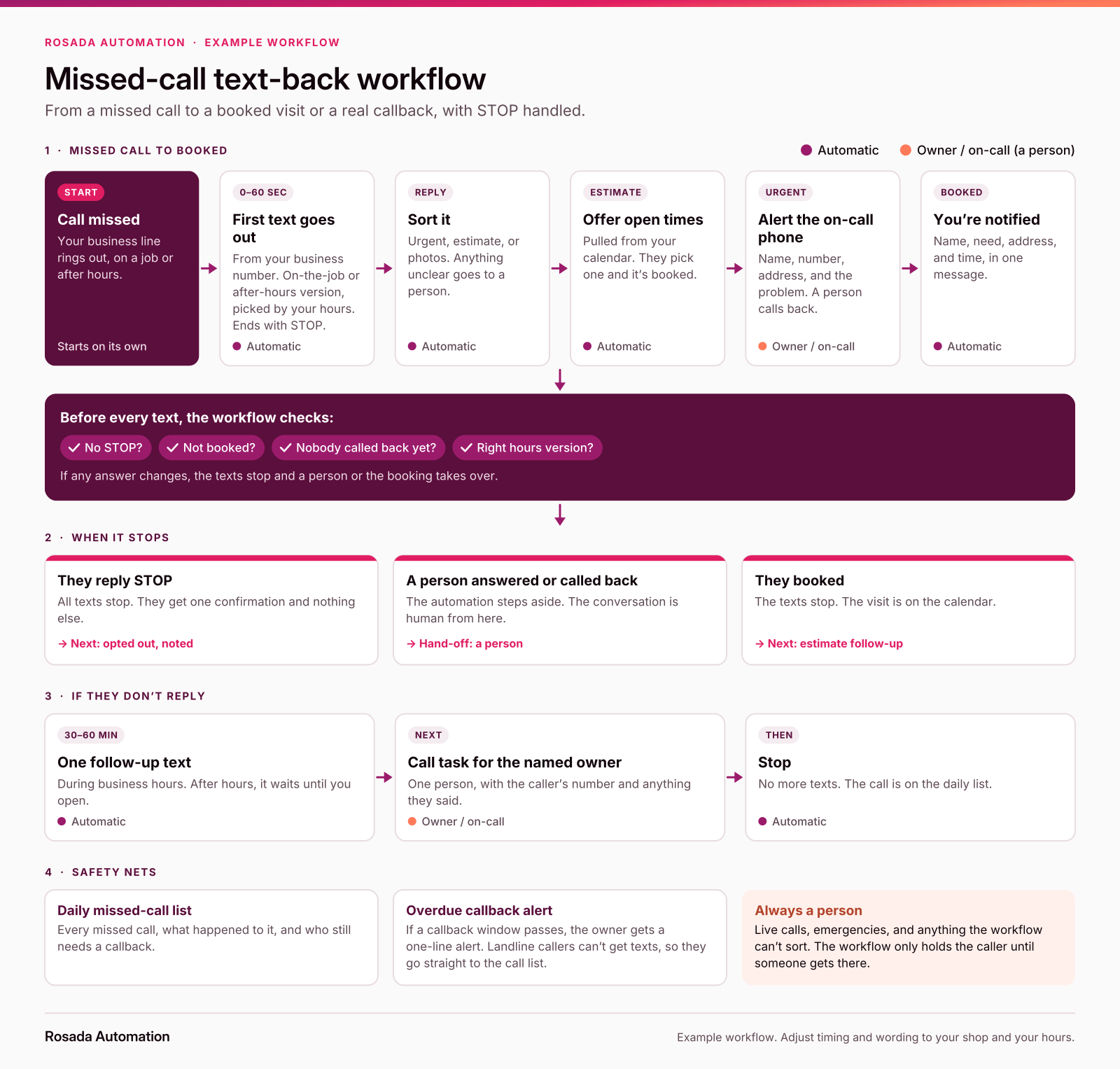
The same flow as the Northside Heating & Air demo on the home page (made-up shop, not a client).
- Call missed. Your business line rings out.
- First text within a minute. On-the-job or after-hours version, based on your hours, with STOP language.
- Reply sorted. Urgent, estimate, or photos. Unclear goes to a person.
- Estimate: open times. They pick one and it's booked.
- Urgent: on-call alert. A person calls back.
- You're notified. Name, need, address, time.
- No reply. One follow-up text, then a call task for the named owner, then stop.
Once an estimate goes out, a different clock starts. Here's how to follow up on unsold HVAC and plumbing estimates.
Set it up with what you already have
Check your own tools first. Jobber's AI Receptionist has an "SMS send back" setting that texts callers who hang up before it can start a conversation, and you can edit the message. Housecall Pro's Voice settings include a Missed Call Automation that texts existing customers when you miss their call, and its CSR AI text follow-up for new callers is in alpha. Turn on what you have, then check who it leaves out.
If something already sends the first text but nobody handles the reply, that's the gap. You don't need a new platform to fix it. You need the sort, the booking step, the on-call alert, and a named owner.
That's what I build: on the phone, calendar, and field-service software you already use, usually in n8n, and you own it.
Texting rules that keep it clean
This is general information, not legal advice. Check the details with your texting provider or your own counsel.
- A reply isn't a marketing campaign. The missed-call text is a one-time, non-marketing reply to someone who just called you. Keep it that way. CTIA, the wireless industry group, says promotional texts need the customer's written agreement first. Turning the missed-call reply into a tune-up coupon or a seasonal drip needs separate written consent.
- Name your business and include STOP. Twilio's messaging policy requires the first message to identify the sender and include "Reply STOP to unsubscribe" or an equivalent.
- Honor opt-outs fast. The FCC treats replies like "stop," "quit," "end," "revoke," "opt out," "cancel," or "unsubscribe" as valid opt-outs. You can send one confirmation text with no marketing in it, then nothing. Opt-outs have to be honored within a reasonable time, no more than 10 business days. A workflow can do it instantly, so it should.
- Register your number. Automated business texts from a local 10-digit number need A2P 10DLC registration through your phone or texting provider.
Canadian shops: Canada's Anti-Spam Legislation (CASL) covers texts too. The CRTC's FAQ says a commercial message needs consent, identification of the sender, and a way to unsubscribe, so check its guidance before you add anything beyond the reply.
Same idea, different industry: speed, consent, and stop on reply all show up in my insurance quote follow-up sequence too.
When you don't need this
If you're a solo plumber who truly always answers, skip it. Same if you have a live dispatcher or an answering service that actually books jobs, not one that just takes messages.
Start with a map
Want to see one run first? Watch the demo on the home page.
FAQ
What should a missed-call text say?
Who you are, that you missed them, and one easy next step. Ask what they need, the address, and whether it's urgent. Give a callback window you can keep. Add STOP language. Skip pricing, service lists, and extra links.
How fast should the text go out after a missed call?
Within about a minute, while the caller still has the phone in their hand. Most phone systems and field-service tools can send it automatically. What matters more is that someone handles the reply quickly, or that the reply books a time on its own.
Should the after-hours text be different from the on-the-job text?
Yes. On a job, promise a callback window today. After hours, say when you open, and only offer an emergency path if someone is actually on call. Don't promise times nobody can meet.
Is it legal to text someone back after they called and I missed it?
A one-time, non-marketing reply to someone who just called you is different from promotional texts, which need the customer's written consent. Name your business, include STOP, and honor opt-outs. This is general information, not legal advice. Confirm the rules with your texting provider and register your number for business texting (10DLC).
Does Jobber or Housecall Pro already do missed-call texts?
Check your settings first. Jobber's AI Receptionist can text callers who hang up before it starts a conversation. Housecall Pro's Voice settings include a Missed Call Automation that texts existing customers after a missed call. Either way, the usual gap is what happens after the customer replies: sorting it, booking a time, and alerting the right person.
Do I still need an answering service if I set up missed-call texts?
Not always. If your calls are mostly estimate requests, texts plus booking may cover it. If you get a lot of emergency calls or callers who won't text, a live answering service or on-call line still matters. The point is that someone books the job, not just takes a message.
Sources
- CTIA, "Messaging Principles and Best Practices," May 2023 (Exhibit II: conversational, informational, and promotional messaging and the consent each needs): https://api.ctia.org/wp-content/uploads/2023/05/230523-CTIA-Messaging-Principles-and-Best-Practices-FINAL.pdf
- FCC, Report and Order FCC 24-24 on revoking consent (opt-out keywords, one-time confirmation text, 10-business-day limit): https://docs.fcc.gov/public/attachments/FCC-24-24A1.pdf
- Eric J. Troutman, "TCPA Consent Primer," National Law Review, April 7, 2025: https://natlawreview.com/article/tcpa-consent-primer-here-are-basics-tcpas-requirements-consent-various-types-calls
- Twilio Docs, "Programmable Messaging and A2P 10DLC": https://www.twilio.com/docs/messaging/compliance/a2p-10dlc
- Twilio Messaging Policy (sender identification and STOP language): https://www.twilio.com/en-us/legal/messaging-policy
- Jobber Help Center, "Receptionist, powered by Jobber AI" (SMS send back), updated July 9, 2026: https://help.getjobber.com/hc/en-us/articles/25315927533847-Receptionist-powered-by-Jobber-AI
- Housecall Pro Help Center, "Email & SMS Communications," January 20, 2026: https://help.housecallpro.com/en/articles/12167734-email-sms-communications
- Housecall Pro Help Center, "Voice Settings Overview" (Missed Call Automation), updated July 22, 2026: https://help.housecallpro.com/en/articles/6750234-voice-settings-overview
- CRTC, "Frequently Asked Questions about Canada's Anti-Spam Legislation," modified February 26, 2026: https://crtc.gc.ca/eng/com500/faq500.htm
Casia