

Blog
AI Receptionist vs Missed-Call Text-Back vs Answering Service: Which One Fits Your Firm?
Casia, Rosada Automation10 min read
An answering service puts a person on the line, missed-call text-back replies by text within a minute, and an AI receptionist answers by voice and can book if it's connected to your calendar. For most 1–50 person firms the deciding question isn't which one sounds best, it's what happens after the call: who books it, who calls back, and how an urgent caller reaches a person. Many firms combine two, such as text-back during the day and a person or AI after hours.
Not sure where your calls go when nobody picks up? Get your free workflow map. About 2 minutes. Free, no call.
What does each one actually do?
I build both AI receptionists and text-back, so I'm not selling you one over the other.
Answering service
A person answers your line with your script. There are two kinds. A message-taking service writes down who called and why, and passes it to you. A booking service can also put routine appointments on your calendar, if you give it access. Callers like hearing a person. The catch with message-taking is that every callback still lands on you.
Missed-call text-back
The call rings out, and within a minute the caller gets a text from your business number asking what they need. The reply is captured and routed to whoever handles it, and can include a booking link. It doesn't reach landlines or people who won't text. I wrote up what the text should say in a separate post.
AI receptionist
An AI voice answers the call, asks your questions, and can book, take a message, or transfer, depending on how it's set up. Jobber's "Receptionist, powered by Jobber AI" is one example. Its help page (updated July 9, 2026) describes separate business-hours and after-hours greetings, an escalation policy that texts or transfers a team member when a caller uses terms you pick, like "emergency," and follow-up tasks when a caller isn't ready to book. If the call came after business hours, that task is set for the following day. Test any tool on your own call types before you rely on it.
How do they compare on what happens after the call?
The greeting is the easy part. What matters is what you're holding the next morning.
| Answering service | Missed-call text-back | AI receptionist | |
|---|---|---|---|
| Who responds | A person, with your script | An automatic text from your number | An AI voice |
| Can it book? | Booking services can, with calendar access. Message-taking ones can't | Yes, if the reply flow links to your calendar | Yes, if it's connected to your calendar |
| How urgent callers reach a person | If the service is told to page or transfer | An "urgent" reply sets off an alert | If it's set to transfer or alert on certain words |
| What's left for you the next morning | Message-taking: every callback. Booking: the exceptions | People who didn't reply, plus landline callers | The exceptions, plus anything it misunderstood |
| What it needs from you | A current script and calendar access | Text wording, number registration, someone who owns replies | Your business info, rules for what it may do, calendar access, script upkeep |
| Where it struggles | Complex or sensitive calls the operator can't answer | Landlines and people who won't text | Callers who hang up on AI, unusual requests |
Prices vary a lot by provider and plan, so get quotes. What drives cost: call volume, after-hours coverage, and whether it books. Also count the time it takes to keep the script current.
Which one fits your firm?
Same three tools, different callers.
Dental office. Callers usually want a person, and the schedule lives in your practice software. A booking answering service, or text-back for overflow at busy times, is often the cleanest fit. Any tool that handles patient information raises the business associate question (see the rules below). HIPAA-safe texting gets its own post soon.
Independent insurance agency. Calls are mostly quotes, service, or claims. Text-back plus a fast handoff to a licensed person works well. An AI receptionist can take details and book a time, but it shouldn't explain coverage or give advice. Those calls go to a producer.
Accounting or consulting firm. Fewer calls, each worth more, and many leads come through a web form anyway. Text-back or a booking link usually covers it. Anything that needs a fit or conflict check goes to a person before a meeting is set.
Home services. If you run an HVAC or plumbing shop, read the after-hours version for HVAC and plumbing shops. My Northside Heating & Air demo (made-up, not a client) shows the text-back path.
Mixing is normal: text-back during busy hours, a person or AI after hours. Pick by what the caller needs next, not by the tool.
The workflow, start to finish
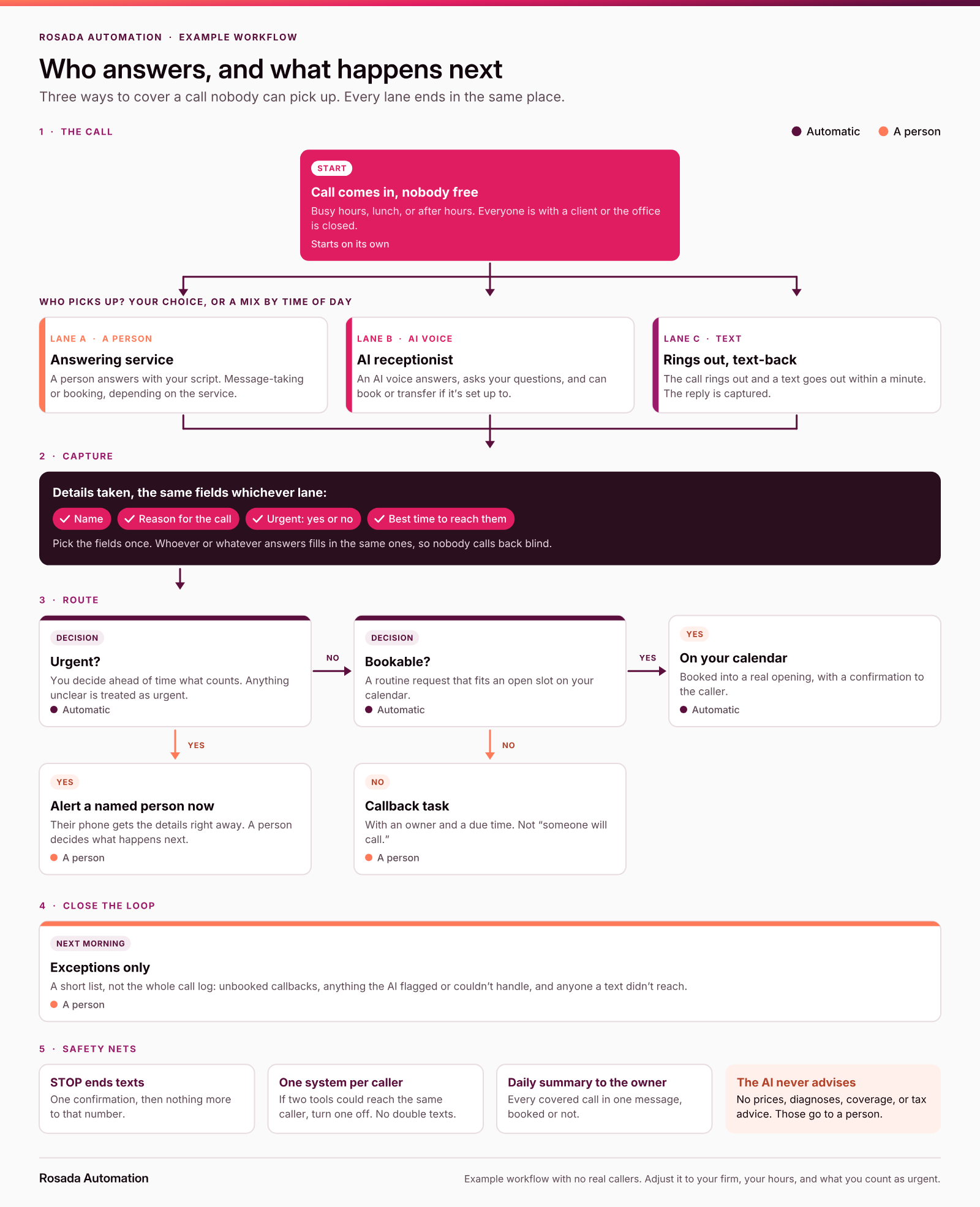
Whichever lane answers, the steps after it should be the same. Every call captures the same four things: name, reason, urgency, and the best time to reach them. Urgent calls alert a named person right away. Routine calls get booked into a real opening with a confirmation, or become a callback task with an owner and a due time. The next morning, someone sees only the exceptions. That's what lets you mix lanes without losing anyone, as long as only one system contacts each caller.

What should each one say?
Keep texts short, name the firm, and put opt-out wording on the first text.
1. Text-back (any firm):
[Firm]: Sorry we missed your call. What can we help with? Reply here and we'll get back to you today. Reply STOP to opt out.
2. Answering-service script opener:
"Thanks for calling [Firm], this is [Name]. Everyone's with a client right now. Can I get your name, the reason for your call, and whether it's urgent?"
3. AI receptionist disclosure line:
"Hi, you've reached [Firm]. I'm an automated assistant. I can book a time or take a message for the team. Say 'person' anytime to leave a message for staff."
4. Callback-task note (internal):
[Caller] · [reason] · urgent: [Y/N] · best time: [time] · owner: [Name] · due: [time]
What rules should you know before AI answers or texts?
This is general information, not legal advice. Check with your counsel.
- AI voices calling out. In FCC 24-17 (2024), the FCC confirmed that the TCPA's limits on "artificial or prerecorded voice" cover AI that generates human voices, so those calls need the called party's prior express consent unless an exemption applies. That's about calls you place, like an AI calling a lead back. AI answering calls made to you is a different situation; ask counsel.
- Saying it's automated. I recommend the assistant says so, like template 3. Jobber's help page encourages telling callers the phone is answered by AI but says it isn't required. Some states have their own rules, so check yours.
- Texting. Register your texting number for business use (A2P 10DLC) through your provider. The CTIA Messaging Principles say to tell people how to opt out, use standard "STOP" wording, and honor every opt-out. Send one confirmation, then nothing.
- Patient information. HHS lists a third-party AI chatbot that handles patient information for things like appointment scheduling as an example of a business associate. Any vendor handling patient information for you should sign a business associate agreement (BAA) first.
When don't you need any of these?
If someone answers almost every call live and calls back the rest the same day, keep that. Another tool may only add cost. Check your software first, too. Housecall Pro's Voice settings, for example, can text existing customers when you miss a call. If something's built in, the gap is usually what happens next.
Start with a map
See an AI receptionist example run (sample data). If you'd rather have someone build it, here are the questions to ask before you hire someone to set this up.
FAQ
Is an AI receptionist better than an answering service?
Neither is better for every firm. An answering service gives callers a person, which matters when calls are sensitive or complex. An AI receptionist can answer and book at any hour if it's connected to your calendar. Choose by what callers need next and how urgent calls reach someone on your team.
What's the difference between missed-call text-back and an AI receptionist?
Text-back lets the call ring out and replies by text within a minute. An AI receptionist answers the call by voice. Text-back is simpler and lets people reply when it suits them, but it misses landline callers. An AI receptionist reaches everyone who stays on the line, but some callers hang up on AI.
How much does an AI receptionist cost for a small business?
It depends on the provider, the plan, and your call volume, so get quotes from a few. The main cost drivers are how many calls or minutes it handles, whether it covers after hours, and whether it books into your calendar. Also count the time someone spends keeping its script current.
Can a dental office use an AI receptionist and stay HIPAA compliant?
It can, with care. Use a vendor that will sign a business associate agreement, limit what the AI collects and repeats, and route clinical questions to staff. This is general information, not legal advice. Confirm with your compliance advisor and the vendor before turning it on.
Can I use more than one of these at the same time?
Yes, and many firms do, such as text-back during busy hours and an answering service or AI receptionist after hours. The rule is that only one system contacts each caller, and every lane ends in the same place: a booked time or a callback with an owner.
Do I need any of these if we answer most calls?
Maybe not. If someone answers almost every call live and calls the rest back the same day, adding a tool may only add cost. Check your missed calls for a couple of weeks first. If calls slip at lunch or after hours, start there.
Sources
- Jobber Help Center, "Receptionist–powered by Jobber AI" (updated July 9, 2026): https://help.getjobber.com/hc/en-us/articles/25315927533847-Receptionist-powered-by-Jobber-AI
- Housecall Pro Help Center, "Voice settings overview" (Missed Call Automation): https://help.housecallpro.com/en/articles/6750234-voice-settings-overview
- FCC, Declaratory Ruling, "Implications of Artificial Intelligence Technologies on Protecting Consumers from Unwanted Robocalls and Robotexts," FCC 24-17 (adopted February 2, 2024): https://docs.fcc.gov/public/attachments/FCC-24-17A1.pdf
- U.S. Department of Health and Human Services, "Business Associates" (content last reviewed July 30, 2026): https://www.hhs.gov/hipaa/for-professionals/privacy/guidance/business-associates/index.html
- CTIA, "Messaging Principles and Best Practices" (May 2023): https://api.ctia.org/wp-content/uploads/2023/05/230523-CTIA-Messaging-Principles-and-Best-Practices-FINAL.pdf
- Twilio Docs, "Programmable Messaging and A2P 10DLC": https://www.twilio.com/docs/messaging/compliance/a2p-10dlc
- Rosada Automation, "AI receptionist" (example run with sample data): https://rosadaautomation.com/automations/ai-receptionist
Casia